

Microsoft Publisher, the often-overlooked member of the Microsoft Office family, is a powerful desktop publishing application that allows users to create visually rich publications such as brochures, newsletters, flyers, and more. However, with the rise of cloud-based services like Office 365, many users are left wondering: is Publisher included in Office 365? For those who have an Office 365 product key 2018 free, the availability of Publisher may depend on the specific plan chosen, as not all Office 365 subscriptions include this desktop publishing tool.
The answer is: it depends.
While Publisher is indeed a part of the Microsoft Office suite, its inclusion in Office 365 plans varies. Let’s break down the specifics to clear up any confusion.
Publisher and Office 365 Plans
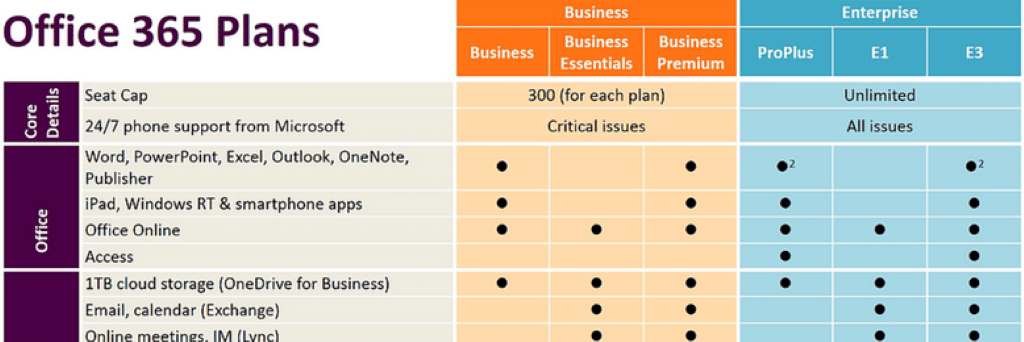
Generally, Publisher is included in the following Office 365 plans:
- Microsoft 365 Personal: This plan, designed for individual use, includes Publisher for PC only.
- Microsoft 365 Family: Aimed at families, this plan also includes Publisher for PC only.
However, there are some important caveats:
- No Mac Support: Publisher is not available for Mac users, regardless of their Office 365 plan. This is a significant limitation for Apple users who rely on this application.
- Business Plans: The inclusion of Publisher in business-oriented Office 365 plans can be more complex. Some business plans might include it, while others may not. It’s crucial to check the specific details of your chosen plan.
- Standalone Versions: If your Office 365 plan doesn’t include Publisher, you can always purchase a standalone version. However, this involves a separate cost.
Why the Confusion?
The confusion surrounding Publisher’s inclusion in Office 365 stems from a few factors:
- Historical Changes: Microsoft has adjusted the applications included in its Office 365 plans over time. This can lead to outdated information circulating online.
- Plan Variations: The sheer number of Office 365 plans, each with its own set of applications, can be overwhelming for users.
- Lack of Clear Communication: Microsoft’s communication regarding Publisher’s availability across different plans hasn’t always been crystal clear, contributing to the confusion.
How to Check if Publisher is Included in Your Plan
To avoid any surprises, it’s always best to confirm whether Publisher is included in your specific Office 365 plan. Here’s how:
- Visit the Microsoft Website: Go to the official Microsoft 365 website and navigate to the details page of your specific plan.
- Review the Included Applications: Carefully examine the list of applications included in your plan. Publisher should be explicitly mentioned if it’s part of the package.
- Contact Microsoft Support: If you’re still unsure, don’t hesitate to contact Microsoft support for clarification.
Alternatives to Publisher
If your Office 365 plan doesn’t include Publisher, or you’re a Mac user, there are several alternative applications you can consider:
- Canva: A popular online design tool with a user-friendly interface and a vast library of templates. It’s a great option for creating visually appealing designs, even with limited design experience.
- Adobe InDesign: A professional-grade desktop publishing software offering advanced features and precise control over design elements. It’s a robust solution for complex projects, but it comes with a steeper learning curve and a higher price tag.
- Scribus: A free and open-source desktop publishing application that provides a comprehensive set of features comparable to Publisher. It’s a viable option for budget-conscious users.
Making the Most of Publisher
If your Office 365 plan does include Publisher, take advantage of its capabilities to create professional-looking publications. Here are some tips:
- Explore Templates: Publisher offers a wide variety of templates for different types of publications. Utilize these templates as a starting point for your designs.
- Customize with Images and Graphics: Enhance your publications with high-quality images and graphics. Publisher allows you to easily insert and edit visual elements.
- Utilize Master Pages: Master pages help maintain consistency throughout your publication. Use them to define common elements like headers, footers, and logos.
- Experiment with Typography: Publisher provides a range of font options and typographic controls. Experiment with different fonts and styles to create visually appealing text.
- Proofread Carefully: Before finalizing your publication, ensure you thoroughly proofread the content for any errors.
In Conclusion
While Microsoft Publisher can be a valuable tool for creating visually engaging publications, its availability in Office 365 plans can be a source of confusion. By understanding the nuances of different plans and verifying the specifics of your subscription, you can avoid any surprises and make informed decisions about your software needs. If you’re unsure about your options, be sure to explore Limafitzrovia blog for insights on navigating these choices. Remember, even if Publisher isn’t included in your plan, there are viable alternatives available to help you achieve your design goals.


